Share this page


JIRA Data Center
AccuSync supports JIRA server/JIRA Data Center (JDC). JDC is an enhanced feature of JIRA which uses a cluster of servers and a load balancer to achieve high availability and performance for the JIRA servers.
The plug-ins supported are:
-
AccuSyncJiraPlugin-2024.1.jar. For JIRA 9. Same as single server.
-
AccuSyncJiraPlugin-2025.4.jar. For JIRA 10. Same as single server.
To work with the JDC:
- Install AccuSync and locate the plug-in files in the \AccuSync\jiraPlugin folder.For example, C:\Program Files (x86)\AccuSync \jiraPlugin\. See How to Install the JIRA Plugin for AccuSync for more information.
- Ensure that the JIRA plugins are added in the respective Add-ons page and restart the AccuSync Server.
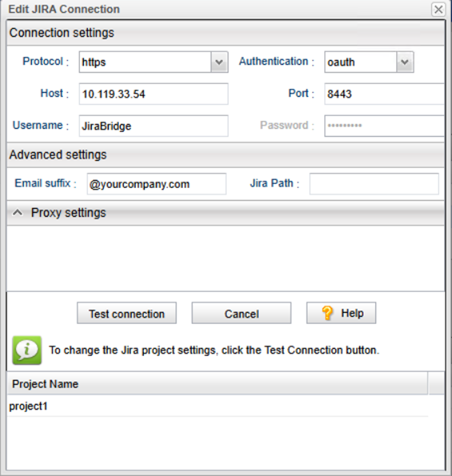
- Edit the
JIRA connection as specified in the image, see
Edit ITS Connection Dialog Box for more information.
 See also: